

Keep drafts and recover removed bible records
A workspace that fits narrow screens, preserves unfinished messages and book edits, and helps you review and recover bible changes.
Your unfinished chat messages and their references now stay with each conversation when you hide the assistant or switch threads. Unsent conversations appear in the conversation menu. Book synopsis, outline, title, and settings drafts also survive tab changes and reloads in the same browser tab when session storage is available. Use Discard draft or Discard changes to clear one deliberately. These drafts are local to your account and tab; save important work before closing the tab.
Removing a bible detail, relationship, or glossary term now offers Undo. You can also open Bible → Recently removed to restore it later with its original identity and associations. This applies to removals made with the updated app. Deleted entries and media are not included; an associated entry must still exist for its record to be restored.
In narrow windows, world navigation and the assistant open as separate panels, and Chapters & bible keeps references within reach without pushing the manuscript far down the page. Navigation groups writing, reference, and management tools, and Continue writing returns to your last chapter in this tab. Appearance has a return link to the workspace you came from.
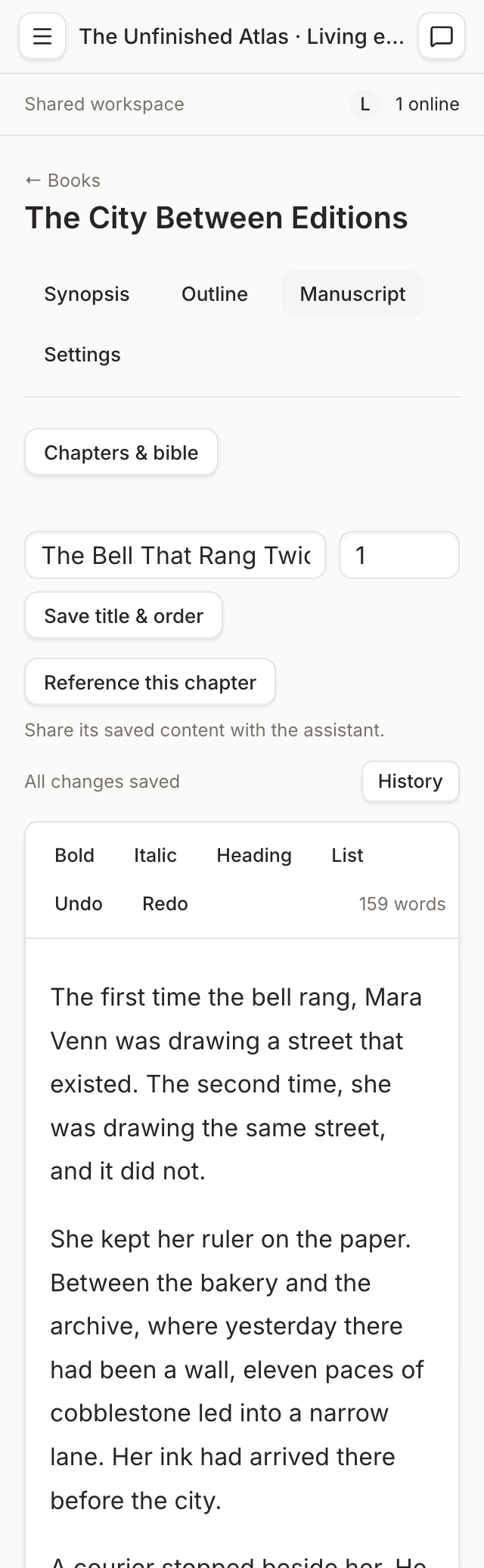
This screenshot shows the implemented local Unfinished Atlas demo. The manuscript and its controls fit a narrow viewport; the chapter and bible list opens when needed.
You can choose Reference this chapter to prepare an assistant message with the chapter’s saved content. Assistant change summaries show the actual details and link to affected records. Relevant recent activity links back to those records too. Viewers see readable content and a view-only notice instead of unavailable editing controls.
Boards now explain the difference between live bible cards, snapshot relationship arrows, and sketches. Select a card or imported arrow to open its bible source. Keyboard focus, form labels, book and history retry actions, touch input sizing, and reduced-motion behavior have also been improved.
Load the updated app to use these changes. Existing saved content and manuscript autosaving continue as before.